03. June 2026
Copilot Token Billing Got Real
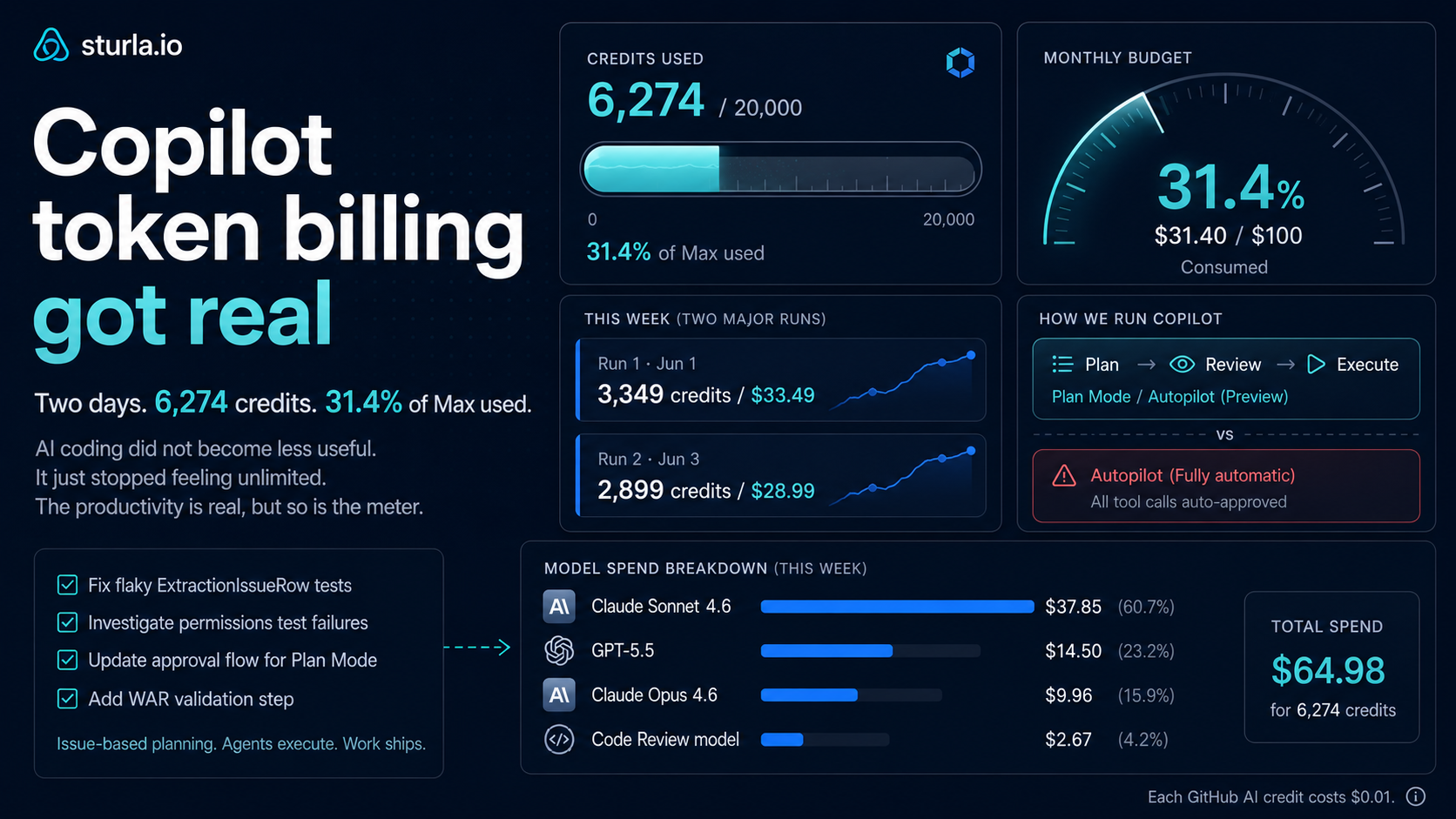
Copilot Token Billing Got Real
GitHub Copilot’s new usage-based billing is now real for me.
I wrote earlier about why Copilot billing is changing and why token noise is now real money. That was the theory.
Now I have the first real numbers from my own workflow.
And boy, it is a rude awakening.
I had a normal but non-trivial SaaS engineering task. Not a one-line bug, not a rewrite. The kind of thing that happens in a real .NET application: Blazor UI, Azure Container Apps, GitHub/Azure integration, OAuth/admin-consent flow, infrastructure deployment, retry behavior, idempotency, and tests across multiple layers.
In other words: real work.
It touched 24 files and took around 2 hours.
The surprising part was not that AI helped.
The surprising part was how quickly the Copilot Max budget started disappearing.
The first run
I used Squad through Copilot CLI to create and refine the plan, and then execute it in automode in one go. I used GPT-5.5 Xtra High, which is probably overkill for this kind of task. Under the new billing model, the important thing is not the old multiplier language. It is the actual model pricing: input tokens, output tokens, and cached tokens are priced differently per model and then converted into AI credits.
That part used about:
| Work | Tool / model | AI credits |
|---|---|---|
| Plan + implementation | Squad / Copilot CLI / GPT-5.5 Xtra High | 3,001 |
| Code review follow-up | VS Code chat / Claude Sonnet 4.6 High | 348 |
| Total | 3,349 |
At GitHub’s AI credit pricing, 1 AI credit = $0.01.
So this one workflow cost around:
3,349 credits = $33.49
That means the AI credit burn-rate for this task was about:
$16.75/hour
Not developer salary. Not infrastructure. Just AI tool usage.
And yes, I picked an expensive model setting. That is part of the exercise, I was trying to get the feel for the real cost.
When these tools are one click away, it is very easy to spend real money without feeling it until the usage page catches up.
The second run made the budget math impossible to ignore
Then I ran the next task I had been preparing with Claude Opus 4.6.
My GitHub usage went from about:
3,375 credits to 6,274 credits
That is another:
2,899 credits = $28.99
This one was larger than the first task. It was not a small bugfix. It was a heavily planned feature slice involving Blazor, deterministic extraction logic, Playwright-style browser fallback, EF/schema changes, workflow updates, preview UX, tests, and CI considerations. Touching (create and edit) over 110 files in total.
So yes, I would call that a large task.
But it was also exactly the kind of task where an agent should have a fighting chance: clear scope, accepted design choices, concrete identifiers, explicit out-of-scope items, acceptance criteria, and a test plan.
And still, it burned almost $29 after the earlier $33.49.
In the first two days of the month, my Copilot Max usage was already:
6,274 / 20,000 = 31.4% of the monthly Max allowance
That is the part that changes the feeling. A few normal engineering sessions can suddenly become a visible part of a monthly budget.
Yes a reality check I just spent almost *one third of my monthly AI coding budget.
So what can we learn from this?
Plan Mode + Autopilot is dangerous for the wallet
The first task was planned and executed using Plan Mode in VS Code with Autopilot.
That means it planned the work and then moved directly into executing that plan.
I will probably never use that again in the same way.
Not because it is useless.
Because it is too easy.
The old workflow was:
Think, review, approve, execute.
The dangerous workflow is:
Think, execute, spend.
When an agent is allowed to go from planning to execution automatically, every slightly-wrong assumption can become file edits, test runs, tool calls, retries, and model usage.
That was already annoying when the cost was hidden inside a subscription.
Now it is metered.
Autopilot is not free momentum. It is a credit-spending machine with a nice UX.
My normal workflow now looks less paranoid
The second task was different, and it confirmed something for me: the more controlled workflow I have been using is probably the right one.
I did not use Squad to do the planning or use Autopilot (to plan and execute right after).
Instead, I created a GitHub issue first. Then I had stronger models review the plan before execution. I used Claude Opus 4.6 and GPT-5.5 as plan reviewers, not as unchecked implementers.
My standard prompt for that is:
Please review this issue and do a gap analysis and update the plan where you think it will make it stronger. Add a comment to the issue explaining what you did.
I also want the issue to use checklist items like:
- [ ] Add the service contract
- [ ] Implement the domain logic
- [ ] Add the tests
- [ ] Update localization
That matters more than it sounds. Agents can tick off completed work, and the bookkeeping stays much cleaner. When the task is large, the issue becomes the working contract instead of just a vague instruction.
This workflow is slower than pressing Autopilot.
But it is cheaper (at least you are less likely to do the wrong thing and having to re-do the work), easier to review, and probably better engineering.
What this means for Copilot Max
I am on Copilot Max, which is $100/month and includes 20,000 AI credits/month: 10,000 base credits and 10,000 flex credits.
That detail matters. If I just bought additional GitHub AI credits directly at $0.01 per credit, then $100 would buy 10,000 credits.
With Copilot Max, the subscription gives me 20,000 included credits for that same $100. So Max is effectively giving me twice the included AI-credit allowance compared with simply topping up at the fixed overage price. That does not make the usage feel cheap, but it does make the plan easier to justify if I actually use the credits.
After these runs, my usage page showed:
6,274 / 20,000 included credits
That makes the plan choice very concrete.
At the first task rate:
20,000 / 3,349 = 5.97 similar tasks
Call it six tasks.
At the second task rate:
20,000 / 2,899 = 6.9 similar tasks
Call it seven larger planned runs.
In practice, a mixed month of planning, implementation, reviews, retries, and “just check this” sessions can eat the allowance very quickly.
I do not think 20,000 credits sounds like a lot anymore.
Not if you are using agents for real work.
The usage dashboard changes behavior
My GitHub usage page now shows 6,274 / 20,000 included credits used for June. ON DAY 2!
The model breakdown is also interesting:
| Model | Included credits | Included usage |
|---|---|---|
| Claude Sonnet 4.6 | 3,785.47 | $37.85 |
| GPT-5.5 | 1,450.46 | $14.50 |
| Claude Opus 4.6 | 996.34 | $9.96 |
| Code Review model | 267.45 | $2.67 |
| GPT-5.4 mini | 10.79 | $0.11 |
The dashboard has started changing my behavior. I now check it during and after agent work like I check cloud costs. Not because I enjoy staring at billing pages, but because the feedback loop matters.
A few serious coding sessions can now show up like a real software bill.
Caching now matters more than it used to
One thing I think developers need to understand better is caching.
In the new Copilot billing model, usage is not just one simple number. GitHub says an interaction can include input tokens, output tokens, and cached tokens. Input is what gets sent to the model. Output is what the model writes back. Cached tokens are context the model can reuse or store, and those cached tokens are priced differently from fresh input tokens.
That means timing can matter.
If I have a large context loaded — an issue, repo instructions, files, terminal output, previous reasoning, test failures, and plan details — then asking the next useful question while that context is still warm can be cheaper than coming back later and forcing the model to rebuild the same context from scratch.
The practical lesson is simple:
When I am in a large agent session, I should ask the follow-up questions while the context cache is still useful.
If I stop, wait too long, and then restart the same investigation later, I may end up paying again for context the model already had earlier.
This does not mean I should rush important decisions. But it does mean I should be more intentional. If the agent has just loaded the repo, read the issue, inspected the failing tests, and built a useful mental map, that is the moment to ask:
- what did you change?
- what are the risks?
- what tests are still missing?
- what should be reviewed manually?
- what should be the follow-up GitHub issue?
That kind of follow-up used to feel like free conversation.
Now it is part of cost management.
Even preparing work costs money now
Another thing that annoyed me:
I was preparing a new task and Squad used Claude Opus 4.6 just to prepare a query before I had really asked it to do anything.
That alone cost:
$0.92
Less than a dollar is not a crisis.
But it changes the feeling.
Before, I mostly thought about whether the agent was being useful.
Now I also think:
Did I just pay almost a dollar for the agent to warm up?
I was using caveman and rtk, so this was not even a completely reckless setup. I was already trying to reduce verbosity and terminal noise.
Still, the cost showed up.
So what am I getting from OpenAI Codex?
This is where I am honestly not fully decided.
And yes, I also have an OpenAI Codex subscription, and I use it to review plans and code because I do not want to burn all my GitHub Copilot credits on review loops (that was at least my thinking).
That can make sense.
But only if Codex is actually replacing GitHub credit usage instead of just becoming another subscription on top.
The simple Copilot math is this:
| Plan | Price | Included credits |
|---|---|---|
| Copilot Pro | $10/month | 1,500 |
| Copilot Pro+ | $39/month | 7,000 |
| Copilot Max | $100/month | 20,000 |
Because additional GitHub credits are $0.01 each, Copilot Max only beats Pro+ if I use more than about:
13,100 credits/month
Below that, Pro+ plus extra credits can be cheaper. But the Max math has one important wrinkle: $100 spent as raw overage buys 10,000 credits, while the Max subscription includes 20,000 credits. So Max is not just “Pro+ with more convenience”. It is a discounted included-credit bundle if I actually consume the allowance.
Compared with regular Pro, Max starts to make sense above roughly:
10,500 credits/month
So the question becomes very practical:
Should I stay on Max, or should I use a smaller Copilot plan and buy extra credits when I actually need them?
For me, Max probably still makes sense if I keep using agents heavily.
But it is no longer automatic. If OpenAI Codex is doing the planning and review work, then I may not need to spend GitHub credits on those same loops. If I pay for both and do not track where the work is happening, I am probably just lying to myself with nicer tooling.
My current takeaway
AI-assisted coding is still worth it. The first task would have taken me longer manually, and the second task was exactly the type of large, structured work where agents can help if they are given a clear plan. I still want these tools in my workflow.
But the economics are no longer invisible.
The old mental model was that I paid for Copilot, and therefore I used Copilot. The new mental model is that I have a monthly AI coding budget, and every model choice, retry, terminal dump, code review loop, and vague instruction spends part of it.
That makes the old* discipline matter again.
- Use the right model.
- Keep the plan visible.
- Make the issue the contract.
- Use checklists.
- Reduce terminal noise.
- Reduce assistant verbosity.
- Do not let agents wander unless the task is worth the burn.
Using the highest reasoning mode for a normal SaaS bug may be like taking a taxi to the kitchen, could be nice but usually totally unnecessary!
What I will do from here
I am not going back to manual-only development. These tools are too useful for that. But I am also not going to treat agentic coding as a flat-rate buffet anymore.
For larger work, I will keep planning in GitHub issues, have strong models review the issue with a gap analysis, require checklists that agents can tick off, and only then execute. For routine work, I will use cheaper and faster models. I will reserve Xtra High and Opus-style runs for hard planning, architecture gaps, or genuinely stuck problems.
I will also keep using rtk to reduce terminal noise and caveman to reduce assistant verbosity. Those tools used to feel like optimization. Now they feel like cost control.
And yes, I will keep checking the Copilot usage page.
AI coding did not become less useful. It just stopped feeling unlimited. The productivity is real, but so is the meter.